

TL;DR: Is Teachable Worth Using in 2026?
Teachable is a hosted platform for selling online courses, coaching, memberships, and digital downloads. It is easy to learn and handles sales tax for you, but it leaves most marketing to other tools.
• Pricing. Starter costs $29/month, Builder costs $69/month, and Growth costs $139/month on annual billing. Larger schools get a Custom plan through sales.
• Free plan. Teachable retired its free plan in 2025. Every paid plan comes with a 7-day free trial and a 30-day money-back guarantee.
• Fees. Starter charges a 7.5% transaction fee on every sale. Builder and above charge 0%.
• Best plan. Builder is the plan I’d choose. It removes the transaction fee and adds a custom domain, student email, and an affiliate program.
• Strengths. An easy course builder, a native coaching product, course compliance rules, free student apps, and tax collected and remitted for you.
• Weaknesses. Published product caps, certificates only on Growth, basic email, no funnels or blog, and a community feature that Teachable has stopped developing.
• My verdict. Teachable is worth using if you want a course or coaching program live quickly and you run your marketing elsewhere. If you want more built in, Thinkific gives most course creators more for the money.
Try Teachable For Free
Teachable launched in 2013 and became one of the best-known online course and coaching platforms that has helped creators earn more than $2 billion through it.
I’ve been a Teachable user from the early days, and I’ve seen its highs, lows, and everything in between.
Its core strengths are ease of use, simplicity, the depth of its learning features, and its payment and tax management features. But it has fallen behind when it comes to marketing and community engagement features.
In this review, I’ll give you my honest take on where Teachable shines, where it falls short, and when you should or shouldn’t choose it.
And if you want to see how Teachable measures up, read my list of the best online course platforms.
Teachable Product Snapshot (2026): What Does It Offer?
Before diving deeper, let me show you what Teachable can do for you.
| Feature / Product | What It Offers |
|---|---|
| Online Courses | No-code builder, AI outline generator, drip content, auto-graded quizzes, course compliance rules |
| Coaching | A separate product type with scheduling, intake forms, and milestones |
| Digital Downloads | Sell PDFs, templates, audio and video files, and spreadsheets |
| Memberships | Subscription tiers with recurring billing, included on every plan |
| Community | In maintenance mode. Closed to new schools, and available only to schools that already created one |
| AI Tools | Course outlines, quiz questions, and transcripts. Growth adds free subtitles and translations |
| Payments and Tax | teachable:pay collects and remits US sales tax, VAT, and GST for you |
| Certificates | Growth and Custom plans only |
| Mobile Apps | Free iOS and Android apps for students |
| Free Plan or Trial | No free plan. 7-day free trial and a 30-day money-back guarantee |
| Starting Price | $29/month on annual billing for Starter, with a 7.5% transaction fee |

What Is Teachable?
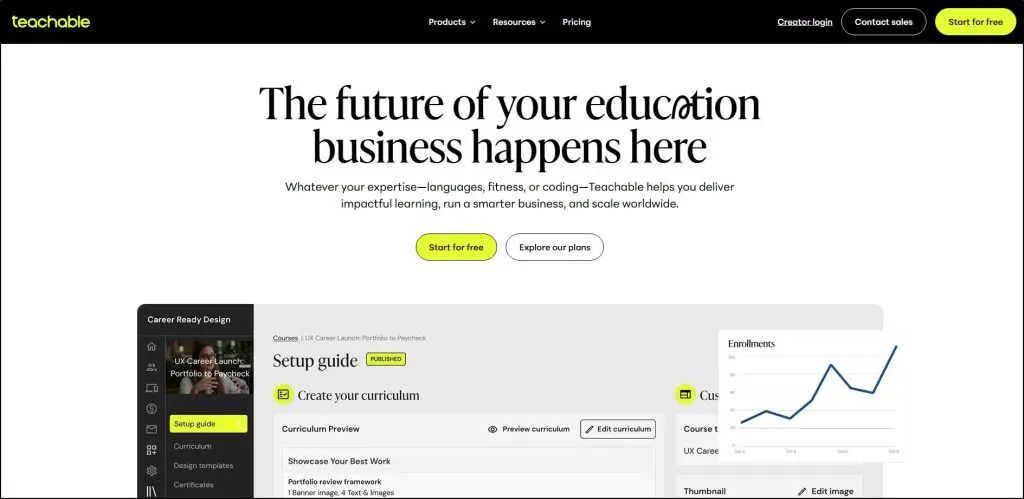
Teachable is a platform that lets you sell online courses, coaching, digital downloads, and memberships from one dashboard. It is now part of the Hotmart group.
It’s built for creators, coaches, and entrepreneurs who want to turn their knowledge into an income-generating business without hiring a web developer.
Here’s exactly what Teachable lets you do:
- Create Online Courses: Build courses in a no-code builder, add video, quizzes, text, and files, and release content on a drip schedule or all at once.
- Offer Coaching Programs: Sell one-on-one coaching with built-in scheduling, intake forms, and milestones for each client.
- Sell Digital Downloads: Upload and sell PDFs, templates, audio files, or video assets as standalone products or in a bundle with courses.
- Launch Memberships: Create subscription offers with tiered pricing and recurring payments.
- Use AI Tools: Generate course outlines, quiz questions, and transcripts to speed up course creation.
- Accept Global Payments: The built-in teachable:pay checkout handles US sales tax, VAT, and GST, manages payouts, and supports cards, PayPal, Apple Pay, and Google Pay.
- Increase Sales: Add coupons, order bumps, upsells, and bundles, send abandoned cart emails, and run an affiliate program from the Builder plan.
- Track Progress: See sales reports, course completion rates, quiz scores, and each student’s progress.
- Brand Your School: Use a custom domain from the Builder plan and remove Teachable’s branding on Growth.
Teachable gives you what you need to sell courses, coaching, and digital products without overwhelming you. Unlike Kajabi, it doesn’t try to be an all-in-one marketing platform, and unlike LearnWorlds, it doesn’t try to be an advanced LMS.
Teachable focuses on being a simple and accessible platform for non-technical creators and coaches. In return, you’ll need other tools for lead generation, email marketing, and community.
Teachable Pricing (2026) | Is It Still Free?
No. Teachable retired its popular free plan in June 2025, when it also replaced the old Basic, Pro, and Pro+ plans. Every paid plan now comes with a 7-day free trial and a 30-day money-back guarantee.
Seven days is short. Thinkific gives you a 30-day free trial and Kajabi gives you a 14-day free trial. In practice, the money-back guarantee is your real testing window on Teachable.
Use our Teachable Pricing Calculator to find the actual cost of using the platform
You can choose between monthly billing and discounted annual billing.
Teachable Plans:
- Starter: $29/month on annual billing or $39/month paid monthly. 5 products, 7.5% transaction fee
- Builder: $69/month on annual billing or $89/month paid monthly. 10 products, 0% transaction fee
- Growth: $139/month on annual billing or $189/month paid monthly. 50 products, 0% transaction fee
- Custom: Custom pricing through the sales team. Unlimited products, 0% transaction fee
Card processing fees apply on every plan. Teachable lists 2.9% + 30¢ for US cards and 3.9% + 30¢ for international cards.
Teachable Pricing Comparison Table
Let’s look closer at what each plan includes.
| Feature | Starter | Builder | Growth | Custom |
|---|---|---|---|---|
| Transaction fee | 7.5% | 0% | 0% | 0% |
| Published products | 5 | 10 | 50 | Custom |
| Admin users | 1 | 1 | 5 | Custom |
| Students | Unlimited | Unlimited | Unlimited | Unlimited |
| Community | ✗ | ✓ | ✓ | ✓ |
| Certificates | ✗ | ✗ | ✓ | ✓ |
| Bulk student imports | ✗ | ✗ | ✓ | ✓ |
| Built-in email marketing | ✗ | ✓ | ✓ | ✓ |
| Affiliate program | ✗ | ✓ | ✓ | ✓ |
| Custom domain | ✗ | ✓ | ✓ | ✓ |
| CSS snippets | ✗ | ✓ | ✓ | ✓ |
| Remove Teachable branding | ✗ | ✗ | ✓ | ✓ |
| Custom user roles | ✗ | ✗ | ✓ | ✓ |
| Zapier & webhooks | ✗ | ✗ | ✓ | ✓ |
| Public API | ✗ | ✗ | ✓ | ✓ |
| Real-time support | ✗ | ✓ | ✓ | ✓ |
| Card processing (Teachable Payments) | 2.9% + 30¢ US, 3.9% + 30¢ intl | 2.9% + 30¢ US, 3.9% + 30¢ intl | 2.9% + 30¢ US, 3.9% + 30¢ intl | 2.9% + 30¢ US, 3.9% + 30¢ intl |
| AI Course Starter, quizzes, lessons, and summaries | ✓ | ✓ | ✓ | ✓ |
| AI subtitles and translations (70+ languages) | Extra usage cost | Extra usage cost | Free, unlimited | Free, unlimited |
| Teachable MCP for Claude (beta) | ✗ | ✗ | ✓ | ✓ |
Courses, coaching products, and digital downloads count toward the published product limit. Memberships and bundles sit outside it, and you can keep unlimited drafts.
The Community row needs a caveat. Teachable has closed Community to new schools, so that row only applies to schools that already created one. I explain this in the community section below.
Which Teachable Plan Should You Choose?
The old version of this review was based on Teachable’s previous plans, so my advice on plans has changed.
- Starter: Good for testing your first idea. You get 5 products and unlimited students. You don’t get a custom domain, student email, affiliates, or certificates, and the 7.5% fee grows with every sale.
- Builder: The right plan for most creators. It removes the transaction fee and adds a custom domain, student email, an affiliate program, and real-time support.
- Growth: Worth it when you need certificates, more than 10 products, extra admin seats, Zapier and webhooks, or the public API.
- Custom: For large academies that have outgrown Growth and need contract terms.
The Starter fee is the number to watch. On annual billing, Builder becomes cheaper than Starter once you sell more than about $530 a month, because the fee then outweighs the price gap between the two plans.
My Teachable pricing guide walks through the full math, including processing fees and the extra 2% that US schools pay when they connect their own Stripe account.
One more thing to weigh. Teachable has restructured its pricing twice since 2023, and many long-time users ended up paying more for tighter limits. I’d host course videos on a service like Vimeo and embed them, so a future move stays manageable.
Read our detailed Thinkific vs. Teachable comparison
Teachable Features: What E-Learning Tools Does It Offer?
I often recommend Teachable to professionals and experts who have very little technical knowledge. That’s the audience Teachable serves best.
It’s for the purists.
It doesn’t try to be everything. It’s no full-stack funnel builder, and it won’t replace your email tool or CRM.
It is a solid learning platform built for people who want to teach, share, and sell their expertise without getting lost in tech.
So as you go through its features, don’t expect bells and whistles. Expect clarity, simplicity, and the core tools you need to build a course-based business.
All the features we’re about to discuss live inside your Teachable School.
What is Teachable School?
On Teachable, everything starts with your School. This is your branded hub where all your learning products live.
Inside a single school, you can create and sell multiple products, including:
- Online courses (with structured lessons and quizzes)
- Coaching programs (sold alone or with a course)
- Digital downloads (like PDFs, templates, or guides)
- Memberships (access to multiple products with recurring billing)
You manage sales, content, students, and reports from one clean dashboard. From the Builder plan, your school can use your own domain. On Starter, it sits on a Teachable address.
Find out the best Teachable alternatives
Feature #1: Online Courses
Teachable lets you structure courses with sections and lessons using video, audio, PDFs, and text. You can drip content, set course compliance rules, and track student progress.
You can also add auto-graded quizzes, short-answer assessments, and downloads. Live sessions aren’t native, so you embed them from Zoom, YouTube, or Vimeo.
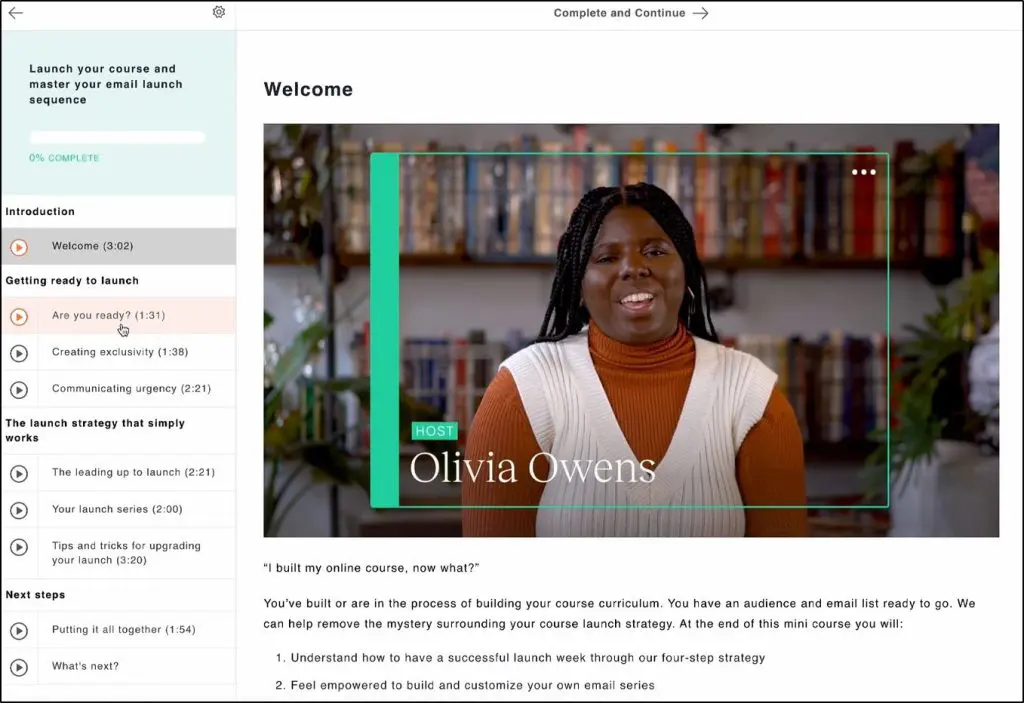
Students can take courses on a desktop or in Teachable’s free mobile apps. The builder makes organizing your course simple, and the AI tools draft outlines, write quiz questions, and produce transcripts, which saves hours of manual work.
Two limits matter here. Completion certificates come only with the Growth plan, so Starter and Builder users can’t issue them. Teachable also has no SCORM support, interactive video, or learning paths, so it suits a video course better than formal training. If you need those, read how Teachable compares with LearnWorlds.
For a first course, it’s all straightforward. If you’re creating an online course for the first time, you can have it live in days.
Feature #2: Online Coaching
Just like courses, coaching is a standalone product type inside your Teachable school, and it’s one of the areas where Teachable stands out.
If you’re a consultant, trainer, or coach who sells sessions, this feature gives you a dedicated space to structure and manage your coaching business with fewer third-party tools.

Here’s what you get:
- Milestone-based coaching plans with tasks and meeting links
- Client messaging and file sharing inside Teachable
- Custom intake forms to qualify and onboard the right clients
- Built-in scheduling so clients book inside your school
- Sales pages to promote your coaching services
- Upsells and order bumps to increase your average client value
- Built-in payments and tax handling with teachable:pay
Teachable doesn’t host the video call itself, so you’ll still run sessions in a tool like Zoom. For a coaching program tied to your courses and digital products, it’s a lightweight system that works. You can also compare it with dedicated online coaching platforms.
Feature #3: Memberships
Teachable lets you create membership tiers that give students ongoing access to content, courses, or coaching under one subscription.
You set monthly or annual pricing and add fresh content regularly to keep members engaged. Memberships come with every plan, and they don’t count toward your published product limit.
That last point helps on the lower plans. For example, a Builder user at the product cap can still package courses into membership tiers.
Teachable suits a membership built around a content library. If discussion and live events keep your members paying, look at dedicated membership site platforms.
Feature #4: Online Community
This is the biggest change since I last updated this review. Teachable has put its Community feature into maintenance mode.
According to Teachable’s help center, that means three things.
- Teachable isn’t adding new features to Community.
- Teachable isn’t actively fixing bugs reported in Community.
- Community is no longer available for new schools or for schools that haven’t previously created a community.
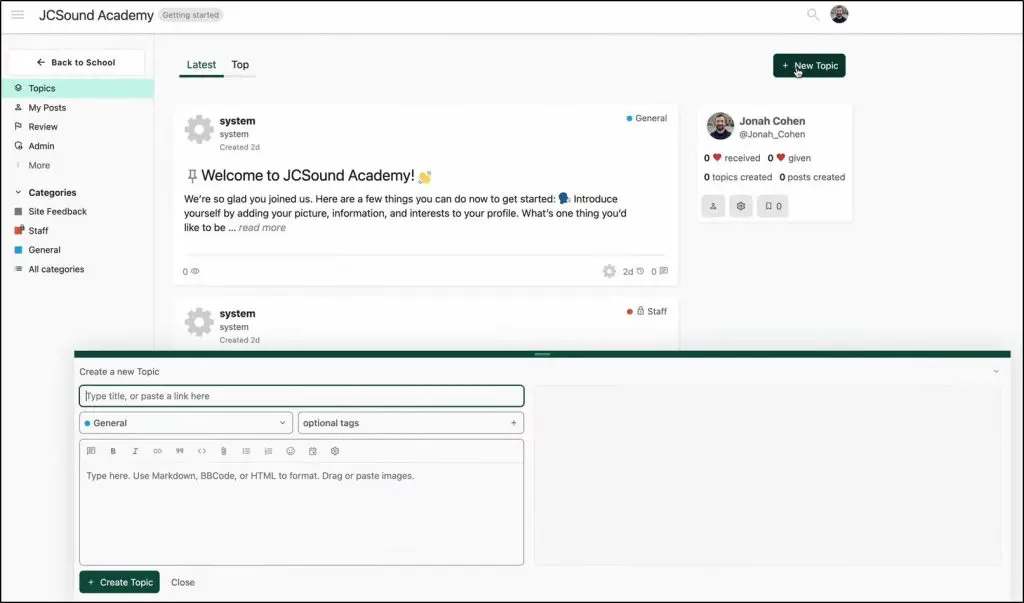
If your school already has a community, it keeps working. You still get categories, topics, tags, moderators, direct messages, and access rules by course or membership tier. The community runs in a browser and isn’t supported in Teachable’s student app.
If you’re opening a new school, you can’t create one. Teachable’s pricing page still lists Community on its higher plans, so don’t let that row decide your purchase.
Teachable now points creators to two options.
- Course comments. Students comment under individual lessons, with threaded replies, and you can require approval before comments appear.
- A third-party community. Teachable suggests Discord or Slack, linked from the student dashboard. Students need a separate account there.
Course comments work for questions about a lesson. They don’t give you a member space, events, or a place for learners to meet each other.
In my experience, community is what keeps learners around now that AI tools have made content easy to find. So this gap matters.
If community is central to your business, pair Teachable with Circle or choose a course platform that still develops its community feature, such as Thinkific or Kajabi. My roundup of the best online community platforms covers the options, and my Circle review goes deeper on the one I’d pair with Teachable.
Feature #5: Digital Downloads
Digital downloads are standalone files, templates, PDFs, audio, spreadsheets, or guides that you can sell on their own or alongside your courses. It’s a quick way to earn from content you’ve already created.
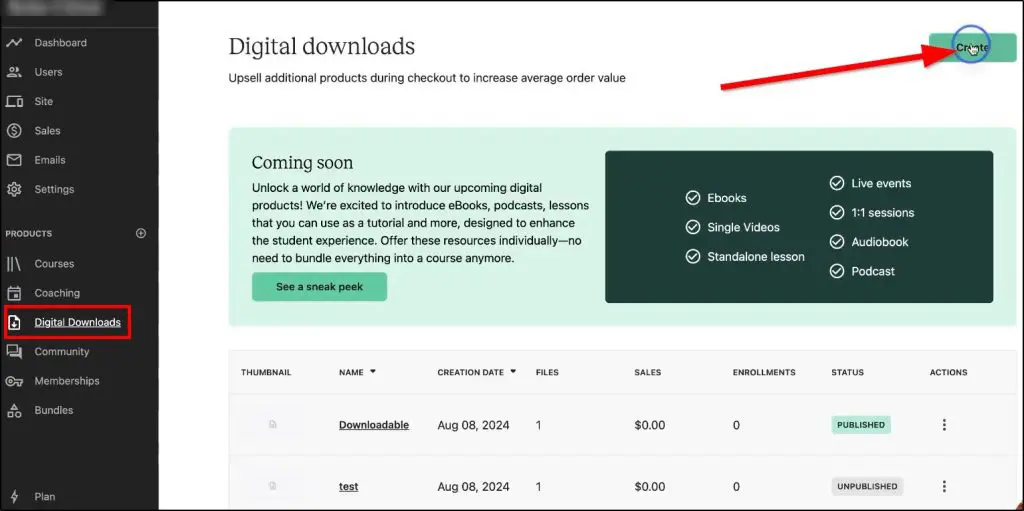
Teachable lets you upload files directly or link to external content like a Canva template or Google Sheet. You add a name, price, description, and thumbnail, and Teachable creates a clean product page where customers buy and get the file instantly.
You can use downloads as upsells, bundle them with your courses, or offer them free to grow your email list. Keep in mind that each published download counts toward your product limit.
Feature #6: Instructor Tools
Teachable gives you a solid set of tools to teach like a pro, even if you’re not one yet. You can track student progress and see who’s falling behind.
To assess understanding, you’ve got auto-graded quizzes and short-answer assessments. Course compliance lets you require students to finish lessons in order, watch a set share of a video, or pass a quiz before moving on. My guide on how to create quizzes covers how to write good ones.
On the Growth plan, you can issue completion certificates to acknowledge progress.
Teachable doesn’t try to gamify everything. It gives you enough control to keep students engaged and accountable.
Feature #7: Student/Customer Tools
Teachable gives your students a clean, distraction-free experience where they can focus on learning and don’t have to figure out the platform.
Students can take your courses on a desktop or in Teachable’s iOS and Android apps, which come free with every plan.
When a student logs in, they see everything they’re enrolled in. If they leave a lesson midway and return days later, they pick up where they left off, and Teachable tracks progress automatically.
Students can also comment under lessons, which is now Teachable’s main discussion feature.
I haven’t found built-in note-taking, though. Teachable also doesn’t send reminder sequences to students who go inactive, so you’d use an external email tool for that.
Feature #8: Website Builder
I get asked a lot about Teachable’s site builder. You can build a real multi-page site with it, but it’s basic.
Teachable gives you a page builder to create a homepage, an about page, a contact page, and individual sales pages for each course or product. It’s enough to get a clean, working site up without writing code.

From the Builder plan, you can use a custom domain and add CSS snippets for design tweaks. Removing Teachable’s branding needs Growth. All plans let you add basic SEO details and collect leads with forms.
Don’t expect a blog or a wide choice of themes. The templates are well-designed and mobile-friendly, and the layout options are limited next to WordPress or Kajabi.
So you can build a simple, branded site with multiple pages on Teachable. If blogging or design variety is important to you, pair it with an external site builder.
Feature #9: Sales & Marketing
This is where Teachable falls behind platforms like Thinkific and Kajabi. Its sales tools cover the checkout well, and they do little to bring buyers to it.
You get these built-in tools:
- Coupons: Create discount codes to drive urgency.
- Upsells & Order Bumps: Increase order value with one-click add-ons at checkout.
- Affiliate Program: From the Builder plan, invite partners to promote your products, and Teachable pays their commissions for you.
- Bundles: Package multiple products into one offer.
- Abandoned Cart Emails: Send reminders to people who don’t complete checkout.
- Subscriptions and Payment Plans: Charge recurring payments or split a price into installments.
- Student Referrals: Let students invite friends with a personal link.
- SEO Controls & Tracking Pixels: Basic fields for page optimization and ad tracking.
Email marketing is where Teachable shows its limits.
Built-in email starts on the Builder plan, and it reaches people already in your school. You can message enrolled students and announce a new course.
It doesn’t support:
- Nurture sequences for leads who haven’t bought yet.
- Segmentation based on behavior.
- Visual funnel builders.
- A/B testing or advanced campaign tracking.
If email is a big part of your sales engine, connect Teachable to one of the dedicated email marketing platforms like Kit or ActiveCampaign. Zapier and webhooks need the Growth plan, so deeper automation between tools costs more.
Feature #10: Analytics
Teachable gives you the core reports most creators need to run a healthy course business, but don’t expect deep data slicing or custom dashboards.
Here’s what you can track:
- Sales Reports: Sales, earnings, refunds, and affiliate payouts.
- Course Reports: Lecture completion, video stats, and quiz results.
- Student Progress: Completion rates and quiz scores for each student.
- Third-Party Tracking: Connect Google Analytics and tracking pixels for insight into visitor behavior.
I haven’t found funnel tracking, cohort analysis, or lifetime value reports. If you’re starting out or running a lean operation, this level of reporting covers the basics.
If you outgrow it, you’ll want to send data to other tools through integrations, Zapier, or the API on Growth.
Feature #11: Teachable Payments
Teachable has a native payment system called teachable:pay that handles the financial side of your business without third-party plugins.
You can take payments through cards, PayPal, Google Pay, Apple Pay, and Buy Now, Pay Later, depending on your region.
It supports subscriptions, one-time payments, payment plans, and international currencies. You also get tools like:
- Order bumps and upsells (to increase cart value)
- Abandoned cart emails (to recover lost sales)
- Affiliate payouts and tracking
- Student referral links
Its biggest advantage is tax. teachable:pay calculates, collects, and remits US sales tax, VAT, and GST for you, so you avoid compliance headaches when you sell internationally. Most rivals leave the filing to you.
You can also connect your own Stripe or PayPal account. If you do, you lose automatic tax handling and several checkout options, and US schools pay an extra 2% per transaction.
You can plan your prices and revenue with our free creator tools before you set up checkout.
Teachable vs. Thinkific, Kajabi, and LearnWorlds
Here’s how Teachable compares with the three platforms I’m asked about most.
| Feature | Teachable | Thinkific | Kajabi | LearnWorlds |
|---|---|---|---|---|
| Starting price (annual billing) | $29/mo | $40/mo | $143/mo | $24/mo |
| Fee on the entry plan | 7.5% of each sale | None with Thinkific Payments | None | $5 per paid enrollment |
| Free trial | 7-day free trial | 30-day free trial | 14-day free trial | 30-day free trial |
| Course limits | 5, 10, or 50 published products | Unlimited courses | Limits by plan | Unlimited paid courses |
| Community | Closed to new schools | Yes | Yes | Yes |
| Email marketing | Students only, from Builder | Automation for leads and students | Full email platform | Mass email from Pro Trainer |
| Sales tax handling | Collected and remitted for you | You file | You file | You file |
| Best for | First courses and coaching | Most course creators | All-in-one businesses | Advanced learning and SCORM |
I’ve compared these in detail in Teachable vs Thinkific, Kajabi vs Teachable, Podia vs Teachable, and Skool vs Teachable. My Thinkific review and Kajabi review cover the two strongest alternatives.
Teachable Pros And Cons
Before we conclude this review, here’s a summary of Teachable’s main strengths and weaknesses.
| Pros | Cons |
|---|---|
| Beginner-friendly course builder that’s easy to learn and navigate | Limited marketing tools with no funnels, blog, or lead nurturing |
| Native coaching product with scheduling, intake forms, and milestones | 7.5% transaction fee on the Starter plan cuts into your margins |
| Built-in tax handling for US sales tax, VAT, and GST | No free plan and a short 7-day free trial |
| Clean, fast checkout with upsells, order bumps, and Buy Now, Pay Later | Published product caps on every self-serve plan |
| Free iOS and Android apps for students on every plan | Certificates need Growth, the most expensive self-serve plan |
| Unlimited students and memberships on every plan | Community is in maintenance mode and closed to new schools |
Is Teachable Worth Your Money? Honest Opinion
Teachable stands out for its simplicity. It gives you a solid, distraction-free way to build and deliver courses, coaching programs, memberships, and digital downloads.
My position has shifted with the new pricing. I used to say Teachable was only worth it if you already had a marketing stack. The Builder plan changes that a little. It costs less than most rivals’ fee-free plans, charges no transaction fee, and gives a first-time creator everything needed to launch and sell a course.
The new plans also bring new limits. Every self-serve plan caps your published products, certificates need Growth, and new schools can’t create a community.
Choose Teachable if:
- You’re launching your first course and want it live quickly.
- You sell coaching alongside courses.
- You sell to buyers in many countries and want tax handled for you.
- You already run email and funnels in other tools and need a simple delivery platform.
Look elsewhere if:
- You want email marketing, funnels, and a website in one platform.
- Community is a core part of your offer.
- You need certificates, SCORM, or advanced assessments without paying for a top plan.
- You plan to publish many courses and downloads.
Overall, I recommend Teachable on the Builder plan for first-time course creators and coaches who value simplicity and run their marketing elsewhere. I’d skip Starter for anything beyond testing, because the transaction fee gets expensive as soon as you sell consistently.
For most other course creators, Thinkific is the better deal. It offers unlimited courses, a living community feature, and stronger automation without sacrificing ease of use. If you want everything in one platform and have the budget, Kajabi is the one to look at.
Frequently Asked Questions (FAQs)
Does Teachable have a free plan?
No. Teachable retired its free plan in 2025. Every paid plan comes with a 7-day free trial and a 30-day money-back guarantee.
Does Teachable charge transaction fees?
Only on the Starter plan, which takes a percentage of every paid sale. Builder, Growth, and Custom charge no platform transaction fee. Card processing fees apply on every plan.
Can you use your own domain with Teachable?
Yes, you can connect a custom domain to your Teachable school on the Builder plan and above. On Starter, your school uses a Teachable address.
Does Teachable still have a community feature?
Only for schools that already created a community. Teachable has put Community into maintenance mode and no longer offers it to new schools. It recommends course comments or a third-party tool such as Discord or Slack.
Does Teachable allow bulk uploading of students?
Yes, on the Growth plan and higher, which let you import students in bulk.
Can I host multiple schools or brands under one Teachable account?
Each Teachable school is its own standalone site with its own subscription. You’d need a separate school for each brand.
Is Teachable mobile-friendly for students?
Yes, Teachable offers free iOS and Android apps for students on every plan.
Can I drip course content to students?
Yes, Teachable lets you release lessons over time with drip scheduling on every plan.
Does Teachable support SCORM or xAPI?
No, Teachable does not support SCORM or xAPI content. It suits native video, text, and quiz-based learning.
Can I sell my courses in different currencies?
Yes, teachable:pay supports multiple currencies and international payments, and it handles sales tax, VAT, and GST for you.
Are there built-in tools for quizzes and assessments?
Yes, you can add auto-graded quizzes and short-answer assessments to your courses.
Can you restrict access based on course compliance?
Yes, Teachable offers course compliance settings that require students to complete lessons in order, watch a set share of a video, or pass a quiz before moving on.
Can I offer certificates of completion?
Yes, but only on the Growth and Custom plans. Starter and Builder don’t include certificates.

Jeff Cobb, Founder of Learning Revolution
Jeff Cobb is an expert in online education and the business of adult lifelong learning. Over the past 20+ years he has built a thriving career based on that expertise – as an entrepreneur, a consultant, an author, and a speaker. Learning Revolution is a place where Jeff curates tips, insights, and resources to help you build a thriving expertise-based business. Learn more about Jeff Cobb here.
Table of Contents





Hi Jeff,
What if I just wanted to add courses to my website to supplement products I sell? I don’t want to sell courses but I do want a learning course for our products. The courses are meant for employees and business affiliates to learn more about the products.
Gustavo – Depending on the nature of the course and what you are using for your Web site, you could do this with a simple membership plug-in like Memberpress. That said, it’s also possible to offer courses for free on Teachable and some of the other platforms, so there is also no reason you could not point people there for courses.
Hi, do you have a recommendation for a multilingual course?
Depends on the language. Most of these will handle Romance/Germanic languages. If you need something like Chinese, Arabic, etc., you might want to consider Moodle. – Jeff
Have you looked at Thinkific to compare the two platforms? I’d be interested on your observations on this!
Yes, see https://learningrevolution.mystagingwebsite.com/teachable-vs-thinkific/.
Wow! This was such a detailed, thorough and helpful review. Thank you so much.